Voice Recorder Pro
- 4.8
- Rating
- 100.00M
- Installs
- Free
- Price

 Analysis by App-foxy
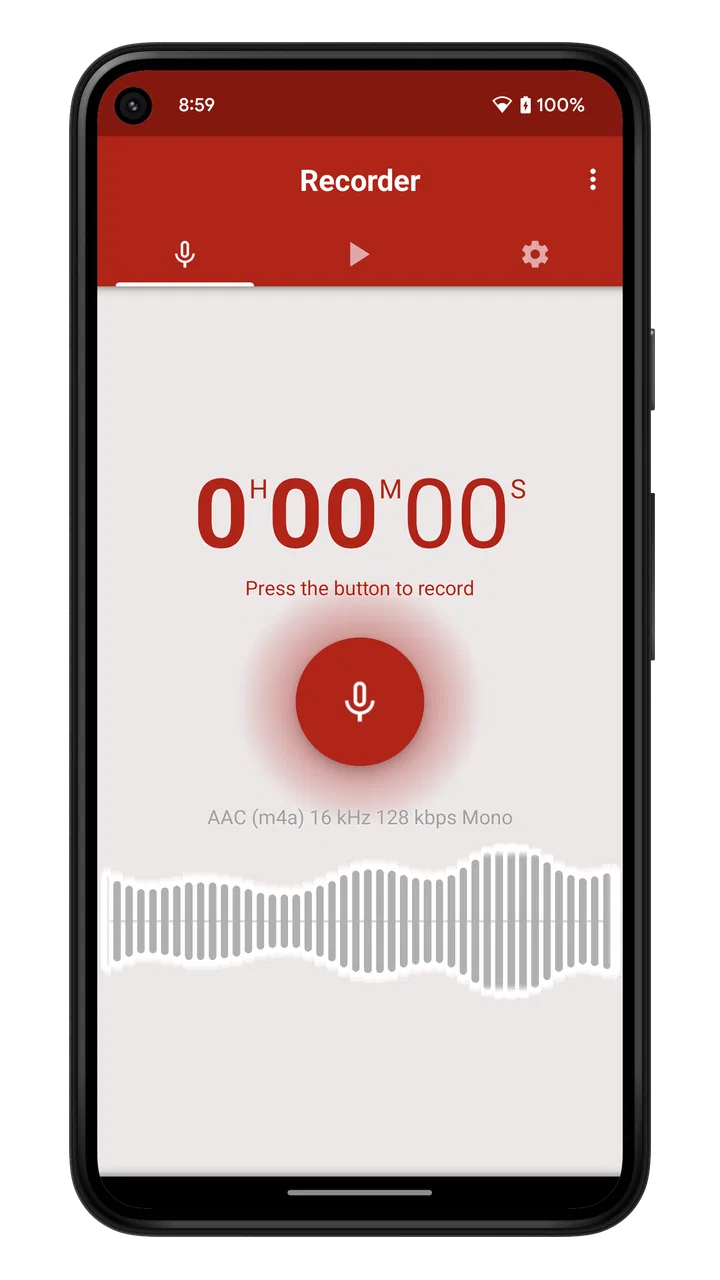
I tried Voice Recorder Pro as a practical everyday audio tool rather than treating it as a studio replacement. It is a free Music & Audio app from Splend Apps, aimed at people who want to capture speech quickly without learning a complicated recording system. That simple purpose is also its biggest strength: the app gets out of the way when an idea, reminder, interview note, or rehearsal thought needs to be saved.
My overall impression is favorable, especially if you use an Android phone as a personal notebook with a microphone. The app has earned a 4.7 average from around 1.4 million ratings and has passed 100 million installs, so it is clearly familiar to a very large audience. Those figures do not replace hands-on judgment, but they fit my experience: this is a focused recorder, not an overloaded audio workstation.
What the recorder feels like in everyday use
The first thing I noticed is how little mental effort the basic task requires. When I wanted to record a short thought, I did not have to decide between a collection of elaborate modes or build a project first. I could concentrate on speaking. That matters when the phone is being used while walking, when a meeting is about to begin, or when a melody comes to mind and may disappear if I spend too long navigating menus.
You May Also Like

 AccuWeather: Weather Radar
AccuWeather Review: A Quick, Clear Forecast for Everyday Decisions
For everyday plans, the best forecast is the one you can understand quickly. AccuWeather makes rain timing, radar, and local conditions easy to act on, with a few trade-offs.

 Hill Climb Racing
Why Hill Climb Racing Still Turns Crashes Into One More Run
A tiny car, a bumpy hill and one more upgrade: Hill Climb Racing keeps resurfacing because its simple chaos makes every near-miss feel personal.

 AliExpress - Shopping App
AliExpress Makes Global Shopping Feel Personal, but Shoppers Bear the Risk
AliExpress turns a global marketplace into a pocket-sized discovery engine. Its reach is useful, its shopping loop compelling, and its trade-offs easy to miss.

 Lords Mobile: Kingdom Wars
Lords Mobile Is a Kingdom-Building Routine, Not a Quick Match
A case-by-case verdict on the building, battles, device demands, and social commitments that make Lords Mobile rewarding for some players and exhausting for others.

 PDF Scanner app - TapScanner
TapScanner Makes Paperwork Easier to Capture, Check, and Share
TapScanner makes scanning with a phone feel less like a rescue operation and more like a dependable step in getting work done. Its capture tools are useful, though not flawless.

 Block Blast!
 Shows How Much a Puzzle Game Can Leave Out
A quiet grid game shows why puzzle players increasingly value instant clarity, repeatable skill and low-pressure play—and where the genre still needs to catch up.
More From Our News Desk
View All News


Voice Recorder Pro belongs to a category where the most useful feature is often speed. A recorder that sounds impressive but takes too long to open is less helpful than a modest tool that is ready when needed. Splend Apps keeps the experience centered on capturing audio, which makes it suitable for students, musicians, journalists doing informal notes, caregivers recording reminders, and anyone who prefers speaking over typing.
I would not confuse that focus with professional production. If you need multitrack editing, detailed mixing, advanced noise restoration, or a full publishing workflow, a dedicated audio application will be a better fit. This app makes more sense as a reliable capture point: record first, then decide later whether the material needs another tool.
When connectivity changes the experience
A voice recorder is unusual because the act of recording does not naturally require a conversation with a server. The useful moment is usually local and immediate: you press the control, speak, and stop. However, the broader experience can still intersect with connectivity when you move recordings between devices, send them to another person, or use them as part of a wider cloud-based workflow.
I appreciate that this distinction helps set realistic expectations. Voice Recorder Pro should be judged first by how comfortably it handles capture on the phone, not by whether it behaves like a connected collaboration platform. If your main goal is to share every recording instantly with a team, a synchronized note or meeting service may suit you better. If your goal is to preserve your own spoken material and handle sharing when convenient, a focused recorder is less distracting.
There is also a practical privacy angle. A spoken memo can contain a phone number, a private idea, a work discussion, or a family detail. I prefer deciding when such material leaves the device instead of assuming that every recording belongs in an online workspace. The app’s straightforward role makes that decision easier, although the exact sharing and storage behavior should always be checked on your own device before using it for sensitive material.
One useful habit is to separate recording from distribution. I record the thought while it is fresh, give it a meaningful name immediately, and only later decide whether it should be sent elsewhere. That avoids turning a moment of inspiration into a rushed connectivity task. It also makes the recorder useful in places where the phone’s network situation is uncertain, without making an unsupported promise about how every function behaves without a connection.
Using it in changing mobile situations
The strongest use case for me is the short, unplanned recording. Imagine walking from a train station and suddenly remembering the structure of an article. Typing while moving is awkward and unsafe, while opening a recorder and speaking a rough outline is natural. Later, I can turn that rough audio into notes when I have time and attention.
It also works well for music sketches. A singer can capture a melody before it fades, and a guitarist can preserve a chord idea without setting up recording software. The result is not necessarily a finished demo; it is a reference that protects the original idea. That is an important trade-off. A simple recording may be more valuable than a polished setup that never gets used.
For students, I see two sensible workflows. The first is recording a personal explanation of difficult material after studying, then listening back to find gaps in understanding. The second is capturing a permitted classroom discussion or a personal revision reminder. In both cases, the app is most useful when recordings are short and labeled clearly. Long, unnamed files become difficult to search through, regardless of how good the microphone sounds.
In a work setting, I would use it for private preparation rather than automatically recording other people. A spoken checklist before a site visit, a summary after a call, or a reminder of questions for a later meeting are all practical. Recording another person may involve consent and workplace rules, so I would treat the app as a personal note tool and ask permission whenever someone else’s voice is involved.
The phone itself still matters more than the app in difficult environments. Wind, traffic, a covered microphone, and a speaker standing far away can reduce clarity before any software has a chance to help. I get better results by holding the phone steadily, keeping the microphone unobstructed, and moving closer rather than expecting the recorder to repair a poor source. That is a simple but often overlooked improvement.
Audio quality and the limits of a phone recorder
The store summary emphasizes easy operation and high audio quality, and I found that positioning the app as a clean, convenient recorder makes sense. For speech and quick musical ideas, the experience is more useful than the word “voice” might suggest. Still, “high quality” should not be interpreted as a substitute for a dedicated microphone in every situation.
Room acoustics can dominate the result. A quiet room with soft furnishings may produce a more understandable recording than a busy room recorded with a better application. I would test the app in the place where I plan to use it instead of assuming that a single sample represents all conditions. A short test recording can reveal rubbing noise, distance problems, or an inconvenient phone position before an important conversation begins.
One of my favorite practical techniques is to record a few seconds, stop, and listen before continuing. That small check catches problems early. It is especially valuable when the phone is inside a case, placed on a table, or positioned near a fan. The habit costs almost no time and is more dependable than discovering after a long session that the voice was too quiet.
Another useful trade-off is duration. I prefer several clearly labeled recordings for separate ideas rather than one huge file containing an entire day of thoughts. Short files are easier to revisit, share selectively, and discard responsibly. A single long recording may be appropriate for a continuous lecture or rehearsal, but it creates more work when you need to find one sentence later.
What happens when a recording goes wrong
Every recorder deserves to be judged by its failure moments, not only by the happy path. A missed recording can be caused by a low battery, a notification, an accidental touch, a noisy room, or simply forgetting to press the control. Voice Recorder Pro cannot remove all of those risks, so I use a repeatable routine before anything important: check the microphone position, make a short test, confirm that the input is understandable, and then begin the real take.
If the material matters, I also avoid treating the first take as the only take. For an interview question, a spoken reminder, or a musical phrase, repeating the key part gives me a backup against a cough, interruption, or unclear sentence. This is not glamorous, but it is more useful than relying on a single perfect attempt.
Recovery after recording is equally important. I would stop and review the file while the context is still fresh, rather than allowing several unnamed clips to accumulate. A descriptive label can include the subject, location, or purpose without exposing private details. That makes later retrieval faster and reduces the temptation to replay everything just to identify one clip.
Connectivity can complicate recovery when sharing is involved. If a file does not send immediately, I would keep the original recording, avoid repeatedly creating confusing duplicates, and try the transfer again later. The key principle is simple: the phone copy is the working source until I know that the recipient or destination has received what I intended. I would not delete the original merely because a sharing screen appeared to complete.
For important material, I would create a second copy through a method I already trust, whether that means transferring it to another device or placing it in my normal storage system. The exact method depends on the phone and the user’s setup, but the reasoning is universal: a recorder is not a complete archiving strategy. Voice Recorder Pro is good at the capture stage; long-term organization still requires personal discipline.
Using it without wasting data or attention
Audio files can become inconveniently large when recordings are frequent or lengthy, so I try to make each clip purposeful. I stop the recording when the thought ends instead of leaving the microphone running while I search for something else. That saves storage, reduces later listening time, and makes sharing more manageable.
When I am on a limited mobile plan, I prefer postponing nonessential transfers until I have a connection I am comfortable using. This is less about the recorder itself and more about the complete phone workflow. A local capture may be quick, but sending many audio files can consume data and battery depending on the method chosen afterward. Recording in batches and organizing before sharing is a sensible compromise.
There is also a human cost to constant recording. If every idea becomes an audio file, the library can turn into a pile of unfinished obligations. I get more value by using the app for material that benefits from voice: thoughts with emotion, melodies, pronunciation practice, spoken checklists, and explanations that would take too long to type. For simple facts such as a shopping item, text may remain faster to search.
The free price makes experimentation easy, while in-app purchases are listed at $1.99 per item. I would decide about any purchase based on whether it removes a real irritation in my own routine, not simply because the app has many downloads. The basic appeal is that I can test the central recording workflow before spending anything, which is helpful for casual users who are unsure how often they will actually use a recorder.
Who should choose it, and who should look elsewhere
I would recommend Voice Recorder Pro to someone who wants a dedicated voice recording space rather than burying spoken notes inside a general notes app. It is particularly appealing if you value a quick path from idea to audio and do not want a complex editing environment. The Everyone content rating also makes it approachable for a broad audience, while the minimum operating system requirement is Android 6.0.
It is a strong match for personal memos, rehearsal references, study exercises, short interviews with appropriate permission, and spoken planning. It is less suitable for users who need automatic transcription, shared team libraries, sophisticated editing, or a carefully managed studio workflow. In those cases, a notes platform, meeting service, or professional digital audio workstation may justify its extra complexity.
I would also skip it as the sole solution for legally sensitive interviews, high-stakes evidence, or irreplaceable performances. Those situations call for a tested recording chain, explicit consent procedures, backup equipment, and a clear retention plan. A convenient phone app can be part of that setup, but convenience should not be mistaken for a guarantee.
Compared with the built-in recorder that may already be on a phone, the main reason to try this app is its dedicated identity and focused experience. Compared with broad note-taking apps, it keeps audio at the center instead of treating it as an attachment. Compared with professional audio software, it is easier to approach but offers a narrower purpose. That middle position is exactly why it works for ordinary users and why specialists may outgrow it.
My final view after using it as a daily tool
Splend Apps has made a recorder that earns its place through practicality. I like it most when I need to capture something now and organize it later, without turning a simple voice memo into a technical project. Its popularity, free entry point, and approachable design make it easy to recommend to friends who want an audio notebook rather than a production suite.
The best results come from using it deliberately: test the microphone, keep the phone close, name recordings sensibly, make backups for important material, and treat sharing as a separate step. Those habits address the real weaknesses of mobile recording more effectively than chasing complicated settings.
My connectivity verdict is straightforward: the app makes the most sense as a focused capture tool whose value begins on the phone and whose sharing workflow should be handled thoughtfully. I would choose it for quick ideas, speech practice, reminders, and personal recordings. I would choose something else when collaboration, transcription, advanced editing, or formal archival control matters more than speed.
With a current version of 3.40 and a release history reaching back to October 21, 2014, it has the feel of an established utility rather than a novelty. I would install it for anyone who regularly says, “I need to remember this,” and wants a more natural answer than stopping to type.
FAQs for Voice Recorder Pro
01Is Voice Recorder Pro free to use?
Yes, Voice Recorder Pro offers a free version with basic features suitable for casual users. However, there are in-app purchases and a premium version available that unlock advanced features like cloud storage integration, enhanced editing tools, and ad-free experience. Users can choose to upgrade based on their recording needs.
02What formats does Voice Recorder Pro support for audio files?
Voice Recorder Pro supports a variety of audio formats, including MP3, WAV, AAC, and AMR. This flexibility allows users to choose the best format for their needs, whether for high-quality recording, easy sharing, or efficient storage. It’s ideal for professionals who require different formats for different purposes.
03Can I edit recordings directly within the app?
Yes, Voice Recorder Pro includes a built-in audio editor that lets you trim, cut, and enhance your recordings. The editing tools are user-friendly, allowing even beginners to make precise adjustments. Advanced features, such as noise reduction and equalizer settings, might require a premium subscription.
04Does Voice Recorder Pro support cloud storage?
Voice Recorder Pro offers integration with popular cloud storage services like Google Drive, Dropbox, and OneDrive. This feature is particularly beneficial for users who need to access their recordings from multiple devices or share files easily. Note that some cloud services may require a premium subscription for full integration.
05How does Voice Recorder Pro handle background noise?
Voice Recorder Pro is equipped with noise reduction features to help minimize unwanted background sounds. While the app performs well in most environments, achieving optimal results might require using an external microphone or adjusting settings manually. Premium users gain access to advanced noise filtering options for enhanced clarity.
Pros
- High-quality audio recording.
- User-friendly interface.
- Multiple file formats supported.
- Easy sharing options.
- Built-in audio editing tools.
Cons
- Ads can be intrusive.
- Limited cloud storage integration.
- No transcription feature.
- Basic editing tools only.
- Lacks advanced audio effects.

Voice Recorder Pro
Gallery